
For years, Heroku was the standard in platform-as-a-service (PaaS)—the developer-friendly tool that made deploying applications simple. But after Salesforce acquired Heroku in 2010, years of underinvestment reportedly followed. On February 6, 2026, the company officially transitioned the platform to a “sustaining engineering” model—corporate jargon for no new features and no forward roadmap.
The announcement has forced some development teams to reassess—they need a platform that is moving forward, not just standing still, to continue driving innovation. What they’re finding is that not all app deployment platforms are built the same. Some prioritize simplicity at the expense of flexibility, while others offer power but demand steep learning curves. Some are standalone services, and others sit within a broader ecosystem of compute, storage, database, and networking tools.
DigitalOcean App Platform stands out as a strong contender in this space: it’s built on the same Cloud Native Buildpack model that made Heroku popular, it’s backed by an actively shipping roadmap, and it’s part of a full cloud platform that gives teams room to scale beyond PaaS when they need to. If you’re evaluating your options, this DigitalOcean vs Heroku comparison breaks down how the two platforms stack up across pricing, infrastructure, databases, AI and ML workflows, and more.
Key takeaways:
-
PaaS platforms can simplify the application development process by managing infrastructure and offering pre-configured runtime environments.
-
DigitalOcean App Platform and Heroku are both PaaS platforms, but DigitalOcean combines PaaS simplicity with IaaS features such as persistent storage solutions and AI for inference workloads.
-
DigitalOcean offers first-party Managed Databases that are typically more budget-friendly than Heroku’s ‘Premium’ tiers for High Availability. On the compute side, App Platform delivers 2x to 5x more RAM and CPU per dollar than Heroku Dynos, allowing you to scale production workloads.
-
For workloads that require native Bun runtime support, remote MCP server deployment, Docker support, persistent storage, and AI infrastructure, DigitalOcean App Platform is a strong option. It offers architectural flexibility and native infrastructure integration without relying on third-party add-ons.
-
For migrations valued over $2500 /month, DigitalOcean provides a dedicated ‘safety net’ featuring expert guidance from our solution architects and 3 months of free credits to eliminate the operational risk and cost of moving production workloads.
What is a PaaS?
Platform as a Service (PaaS) is a cloud computing model for developers to build, deploy, and manage applications without managing the underlying infrastructure. The cloud provider manages servers, networking, scaling, and runtime environments. Developers focus on writing code while the platform handles deployment and operations. PaaS is used for web apps, APIs, and cloud-native applications.
PaaS vs IaaS
PaaS abstracts infrastructure so you focus on deploying code. Infrastructure as a Service (IaaS) gives you virtual machines, networking, and storage—full control over the environment from the OS up. It’s not an either/or choice—teams often use PaaS for fast app deployment and IaaS when they need granular control over the underlying infrastructure.
| Feature | PaaS | IaaS |
|---|---|---|
| Control | Limited infrastructure control | Full OS and infrastructure control |
| Management | Provider manages runtime, scaling, and patches | You manage VMs, networking, and updates |
| Deployment | Code-based deploy (buildpacks/containers) | Manual server setup and configuration |
| Flexibility | Faster to start | Highly customizable |
| Use case | Web apps, APIs | Custom architectures, legacy apps, complex systems |
What happens when your PaaS provider stops evolving, but your product doesn’t?
With DigitalOcean App Platform, you can migrate from Heroku in as little as two days. Teams report 30%+ savings, with managed databases up to 6x cheaper and no extra charges for VPC, DDoS protection, or internal routing. Check out our Heroku migration guide and get in touch to start your migration.
What is DigitalOcean App Platform?
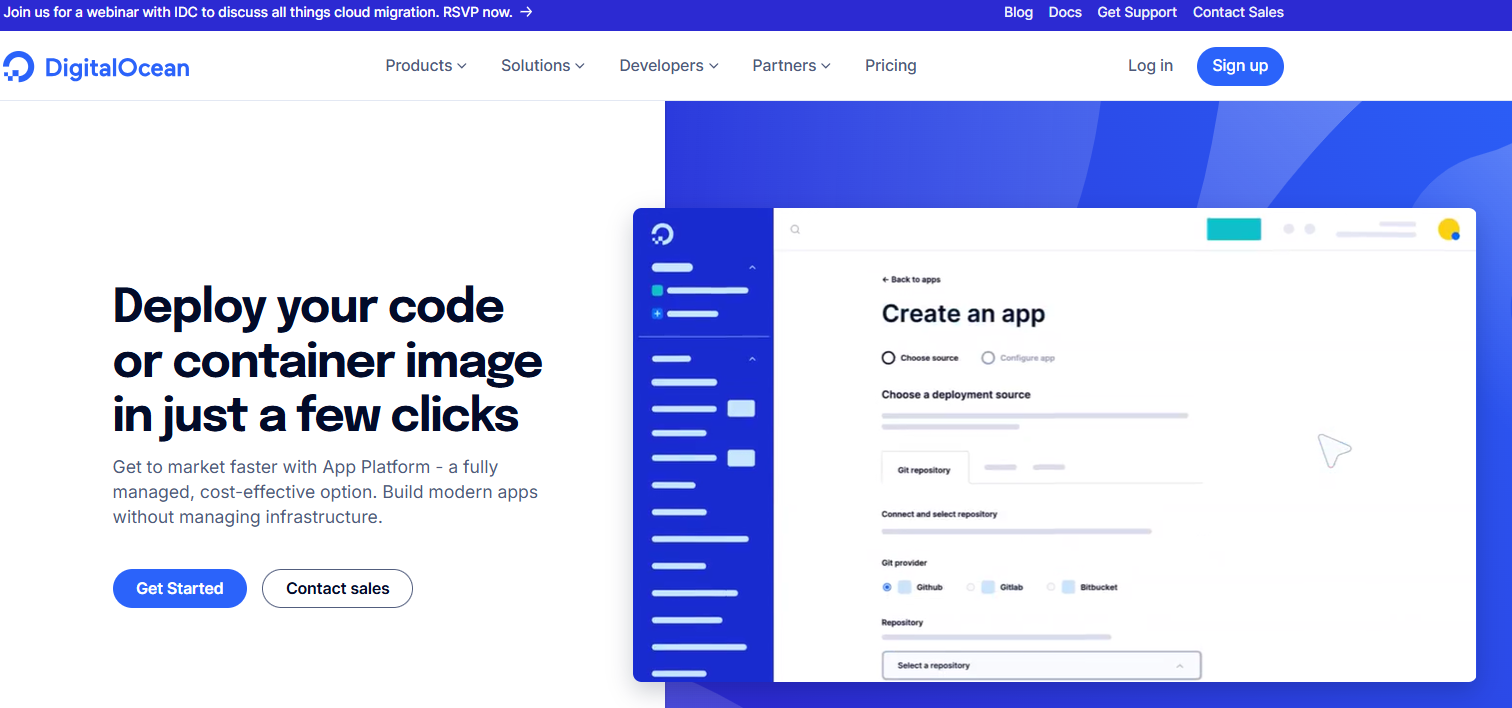
DigitalOcean App Platform is a fully managed PaaS to deploy applications directly from Git repositories or container registries, without managing servers. It combines built-in CI/CD, autoscaling, and enterprise-ready infrastructure so teams can ship faster with predictable costs. Whether you’re building SaaS platforms, AI workloads, mobile apps, or rapid prototypes, App Platform scales with your needs. DigitalOcean also offers IaaS and managed cloud services like Droplets (virtual machines), Kubernetes, managed databases, storage, networking, and GPU infrastructure.
DigitalOcean App Platform key features:
-
Enjoy out-of-the-box support for popular languages and frameworks such as Node.js, Python, Java, Go, PHP, and static sites.
-
Benefit from managed SSL certificates that help protect your apps from DDoS attacks and automatic OS patching to improve security.
-
Monitor deployment progress with clear indicators and easily roll back to previous app versions if needed.
-
Forward logs to external providers such as Papertrail and Datadog for improved analysis and troubleshooting.
-
Connects AI-powered coding assistants like Claude Code, Cursor, and VS Code MCP plugins directly to the DigitalOcean App Platform to deploy apps.
DigitalOcean App Platform pricing:
-
Free Tier - $0/month. Includes up to 3 static sites, 1GiB data transfer per app, automatic HTTPS, global CDN, DDoS mitigation, unlimited team members, and deployment from GitHub, GitLab, or container registries.
-
Paid Tier - Starts at $5/month. Includes all Free Tier features, deployment from Container Registries, shared and dedicated CPUs, application metrics, automatic OS patching, log forwarding, dedicated Egress IP, development and production databases, up to 10 revisions for rollbacks.
DigitalOcean handles cloud migration challenges by providing great migration support and reducing the migration effort with dedicated support from technical experts.
Our Forrester Consulting’s Total Economic Impact (TEI) study found that hosting on DigitalOcean can result in significant cost savings totaling $1.4 million, highlighting the platform’s cost-effectiveness as your infrastructure needs scale.
What is Heroku?
Heroku was launched in 2007 with an aim to simplify deployment for Ruby applications built on Rack. In 2010, Salesforce acquired the company for $212 million. Today, Heroku operates as a managed PaaS to deploy, run, and scale applications using languages like Node.js, Ruby, Java, PHP, Python, Go, Scala, Clojure, and .NET. Heroku has also introduced AI capabilities like Managed Inference and Agents, support for the Model Context Protocol (MCP), and pgvector integration for Heroku Postgres.
In February 2026, Heroku announced it’s shifting to a sustaining engineering model, meaning the platform will continue to operate and receive security and reliability updates, but no new features are on the roadmap. Existing customers can keep using the platform with no changes to pricing or service, but new enterprise contracts are off the table.
Heroku key features:
-
Heroku Dynos are lightweight, isolated containers that run application code and dependencies.
-
Offers Managed Apache Kafka service for event-driven architectures, microservices, and data pipelines.
-
Provides bi-directional data synchronization between Heroku Postgres and Salesforce organizations.
-
Adds security, compliance, and governance features like identity federation, private spaces, and fine-grained access control.
-
Supports team-based workflows with role-based permissions and centralized billing.
-
Dynos - Starts at $5/month with 0.5 GB RAM, 1x-4x Compute
-
Heroku Data Services database - Key-Value Store plan starts at $3/month with 25 MB RAM.
-
Heroku Managed Inference Agents - Starts at $0.06 per 1M tokens.
Axolo migrated from Heroku to DigitalOcean App Platform in just 2 days, moving a production Node.js backend handling 30,000 webhook requests per day. Their projected Heroku cost of $560/month dropped to $65/month on DigitalOcean with an 88% reduction. The new setup ran on two 2GB servers and a 1GB Redis instance, delivering similar performance at a fraction of the cost.
DigitalOcean App Platform vs Heroku
Choosing the right cloud application platform impacts your business’s cloud operations, influencing everything from deployment ease to scalability to cloud ROI. DigitalOcean App Platform gives teams the flexibility to start simple and scale into full infrastructure through DigitalOcean’s IaaS offerings as needed. Heroku, by contrast, operates solely as a PaaS—making deployment easy but limiting your options when you outgrow it.
Here’s how DigitalOcean and Heroku stack up across the factors that matter most:
Platform velocity and innovation
Platform velocity determines how well a cloud platform keeps pace with how you actually build today. For example, if agentic AI frameworks like OpenClaw start gaining adoption, an actively evolving platform might add support for OpenClaw so you can deploy AI agents. On a maintenance-mode platform, you may need to rely on workarounds or move to a different provider to support the same workflow.
DigitalOcean App Platform has introduced the following updates in 2025 and early 2026:
| Recent addition (2025–2026) | Feature |
|---|---|
| Native Bun runtime support | Deploy high-performance JavaScript apps without Dockerfiles or manual runtime configuration. |
| Remote MCP server deployment | Build and host AI tool servers with streaming and subdomain routing for advanced AI workflows. |
| Cron Jobs (GA) | Run scheduled tasks (backups, reports, cleanups) directly in App Platform without external schedulers. |
| Environment support, App cloning | Manage dev, staging, and production environments more cleanly and replicate apps in a few clicks. |
| Outbound VPC integration (GA) | Connect apps privately to databases, Droplets, and Kubernetes across regions without exposing traffic to the public internet. |
| AI-assisted migration tooling | Use AI coding assistants to generate configs, troubleshoot builds, and migrate step-by-step with guidance. |
| Native n8n template support | Launch production-ready workflow automation with managed PostgreSQL, SSL, and health monitoring out of the box. |
| OpenClaw deployment support | Run scalable, production-grade AI agents without managing infrastructure manually. |
To eliminate migration friction, DigitalOcean recently open-sourced App Platform Agent Skills. This repository provides structured playbooks for AI coding assistants like Claude, Cursor, and GitHub Copilot. Simply point your AI agent at the repository, and it will automatically translate your Heroku Procfiles, app.json configurations, and add-on requirements directly into a production-ready DigitalOcean App Spec (.do/app.yaml). It unblocks development teams completely, allowing you to execute full-stack migrations, configure PostgreSQL databases, and set up CI/CD deployments through natural language.
Meanwhile, Heroku made it official in February 2026: no new features are coming. The platform remains operational for existing customers, but Salesforce has shifted its engineering investment elsewhere.
Over the years, some developers have pointed to trade-offs such as limited infrastructure customization, rising costs at higher tiers, and less direct control over the runtime environment. Others have observed that the pace of platform innovation might have slowed down following the Salesforce acquisition. Several users have reported intermittent service failures, inability to access the dashboard or CLI, problems restarting dynos, failed deployments, and even issues accessing the status page itself.
Pricing and cost efficiency
Pricing and feature information in this article are based on publicly available documentation as of February 2026 and may vary by region and workload. For the most current pricing and availability, please refer to each provider’s official documentation.
| Factor | Heroku | DigitalOcean |
|---|---|---|
| Pricing | Dynos - Starts at $5/month with 0.5 GB RAM, 1x-4x Compute Heroku Data Services database - Key-Value Store plan starts at $3/month with 25 MB RAM. Heroku Managed Inference Agents - Starts at $0.06 per 1M tokens. | Free Tier - $0/month. Includes up to 3 static sites, 1GiB data transfer per app, automatic HTTPS, global CDN, DDoS mitigation, unlimited team members, and deployment from GitHub, GitLab, or container registries. Paid Tier - Starts at $5/month. Includes all Free Tier features, deployment from Container Registries, shared and dedicated CPUs, application metrics, automatic OS patching, log forwarding, dedicated Egress IP, development and production databases, up to 10 revisions for rollbacks. |
| VPC / Network Isolation, Internal service routing, Cloud firewalls | Private Spaces custom pricing | Included at no additional cost (within platform limits) |
| Content Delivery Network (CDN) | Add-on Edge with the AWS CloudFront CDN starting at ~$0.007/hour. | Global CDN (Cloudflare-backed) is included for static assets. Data transfer beyond included limits is billed separately based on usage. |
| DDoS protection | Developers are expected to implement rate limiting in their app or use third-party mitigation services, with enhanced controls available in Private Spaces. | Included at no additional cost (baseline protection) |
DigitalOcean offers a straightforward and transparent pricing model that suits developers, AI-native startups, and digital native enterprises. Unlike platforms where sudden traffic spikes might lead to “bill shock” from unmanaged database hits, DigitalOcean’s transparent billing caps and autoscaling help manage costs. DigitalOcean App platform offers a free tier as well as a range of plans tailored to different needs. DigitalOcean’s pricing is based on usage, with clear costs for other products like Droplets and storage. Each App Platform plan includes an amount of free outbound data transfer. Additional outbound transfer is billed at $0.02 per GiB. Inbound transfer to App Platform is free of charge. Our pricing structure and predictable bandwidth overages help ensure that even when your app is under load, your infrastructure spend remains a predictable line item rather than a moving target. This structure helps businesses of all sizes plan their expenses and scale their infrastructure cost-effectively without the fear of unexpected costs."
Heroku employs a tiered pricing model that might become costly as applications grow. The platform provides a variety of Dyno sizes and additional services, but the costs might add up quickly when factoring in multiple Dynos, managed databases, and add-ons. Heroku’s pricing may not be cost-effective for all business sizes, particularly when scaling larger applications.
Cost comparison
-
One notable difference between the two platforms is the availability of a free tier. DigitalOcean offers a basic free plan that allows users to test the platform and deploy small applications without any initial cost. In contrast, Heroku does not provide a free tier, which might be a barrier for developers who want to experiment before committing financially.
-
DigitalOcean App Platform is generally less expensive than Heroku dyno tiers for production workloads. For example, a Heroku Fir Standard-1X dyno costs $25/month with 0.5GB RAM, 1 vCPU, while DigitalOcean offers 1 vCPU with 1GB RAM for $10/month. That represents 2× the memory at half the price.
-
The difference widens in higher resource tiers and managed data services. Heroku Performance dynos and add-on-based data services might increase monthly spend, whereas DigitalOcean includes several managed services natively.
-
A notable cost difference appears when securing production workloads. If you require network isolation, VPC peering, or static IPs on Heroku, you are forced into Heroku Private Spaces—an enterprise-only feature that starts at over $1,000 per month. DigitalOcean App Platform provides VPC routing, internal service communication, and Cloud Firewalls entirely for free.
Want to get rid of rising add-on costs and limited infrastructure control? If cost, flexibility, and long-term innovation matter to your application, explore Heroku alternatives before deciding on your next cloud provider.
Platform breadth and architecture
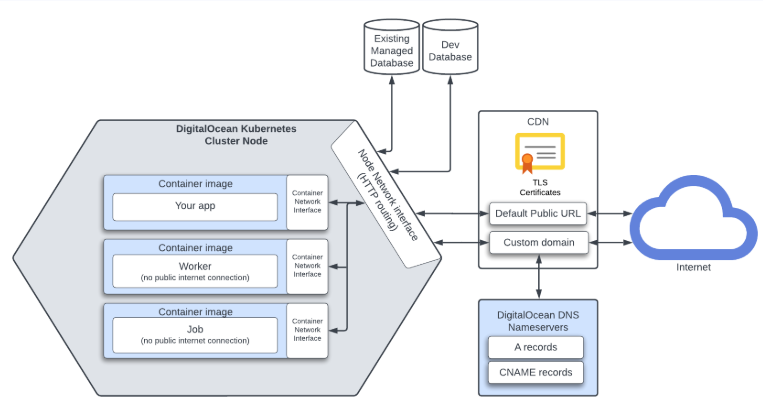
Infrastructure of an app deployed to the App Platform
DigitalOcean App Platform builds and runs applications from Git repositories or Docker images without requiring server management. It automatically detects your application’s language using Cloud Native Buildpacks (CNB) or uses your Dockerfile, builds an OCI-compliant container image, and runs it on a shared DigitalOcean Kubernetes cluster. Applications are composed of components such as services, workers, jobs, databases, CDN integration, and serverless functions, which can be added as needed. This helps teams run multi-tier applications without stitching together external services.
Heroku’s architecture runs on top of AWS technology:
-
Cedar (legacy platform): Dynos ran as Linux containers on AWS EC2-based infrastructure managed by Heroku.
-
Fir (next-generation platform): Dynos run as OCI containers on Amazon EKS (Kubernetes) backed by AWS Graviton (ARM) instances
Heroku’s applications are deployed from source code and run inside lightweight containers called dynos. Developers define how their app runs using a Procfile, and Heroku handles building the app, provisioning dependencies, and managing the runtime environment. Applications scale by increasing the number of dynos assigned to different process types, such as web or worker. Configuration, logging, and add-on services like databases are managed separately from the application code. Heroku’s architecture follows a “one-repo-per-service” model, forcing teams to artificially split their codebases. DigitalOcean App Platform natively supports monorepos. You can deploy multiple web services, background workers, serverless functions, and static sites all from a single repository by defining them in a unified App Spec.
Heroku’s Fir generation, which does not support Docker builds or simplified monorepo deployments, runs on ARM-only architecture (Fir uses AWS Graviton). DigitalOcean App Platform supports Dockerfiles, multi-repo, monorepos via components, and x86/AMD64 instances. DigitalOcean App Platform uses the same CNB architecture that Heroku follows, which makes migration easy. Your Procfile, environment variables, and build steps work in a familiar, code-first way with minimal to no changes. So you don’t need to containerize your app or redesign your workflow.
Databases
DigitalOcean’s Managed Databases are fully managed clusters that remove the operational overhead of setup, patching, backups, and failover. The platform supports popular databases like PostgreSQL, MySQL, MongoDB, Kafka, Valkey, and OpenSearch. Clusters can be scaled vertically (CPU/RAM) and horizontally (adding nodes), with autoscaling storage. Managed databases features include free daily backups with point-in-time restore (up to seven days), automated failover to standby nodes, integrated performance metrics, and alerts.
For example, Camperoni, an online platform, runs its Django backend on DigitalOcean App Platform and uses Managed PostgreSQL as its primary database within the control plane. The application and its data layer are managed under one infrastructure without adding DevOps overhead.
Heroku offers managed data services through Heroku Postgres and Heroku Key-Value Store (Redis), with additional data tools available via its add-on marketplace. Databases are provisioned as attached services and exposed to applications via config vars such as DATABASE_URL. For example, when you deploy an app to Heroku and attach Heroku Postgres, the platform injects the connection string into your app’s environment variables. Heroku manages infrastructure, backups, and high availability depending on the plan tier, and supports rollback through its release system. The add-on marketplace provides options to integrate third-party data services into applications.
Unlike Heroku’s fixed-allocation plans, which can lead to sudden downtime if your database hits its storage limit, DigitalOcean Managed Databases feature built-in storage autoscaling. Your databases will automatically expand storage in 10GiB increments as your data grows, helping to prevent “disk full” panics and saving you from potentially over-provisioning expensive storage upfront. DigitalOcean offers managed databases for PostgreSQL, MySQL, MongoDB, Valkey (Redis-compatible), Kafka, and OpenSearch. Instead of relying on Heroku’s marketplace add-ons, these services are provisioned directly within the DigitalOcean control plane. From the App Platform dashboard, you can create or attach a database in a few clicks. High availability is supported on multi-node clusters, and databases can scale vertically or horizontally as workload demands grow.
Ping Proxies scales its globally distributed proxy platform using DigitalOcean App Platform to deliver low-latency APIs across Europe, the US, and Asia. By relying on managed infrastructure and regional database replicas, the team expands quickly while maintaining performance and predictable costs.
Storage and persistence
DigitalOcean provides multiple storage options across its platform. These storage services are external to the compute layer and are designed for durability, scaling, and production workloads, rather than temporary scratch space. Applications running on App Platform can directly connect to Spaces, Volumes, or shared file systems, so that data persists independently of container restarts or scaling events.
-
Applications can use Spaces for S3-compatible object storage with built-in CDN delivery.
-
Block Storage Volumes for attaching persistent disks to compute resources.
NFS-based shared file systems for workloads that require shared state across instances.
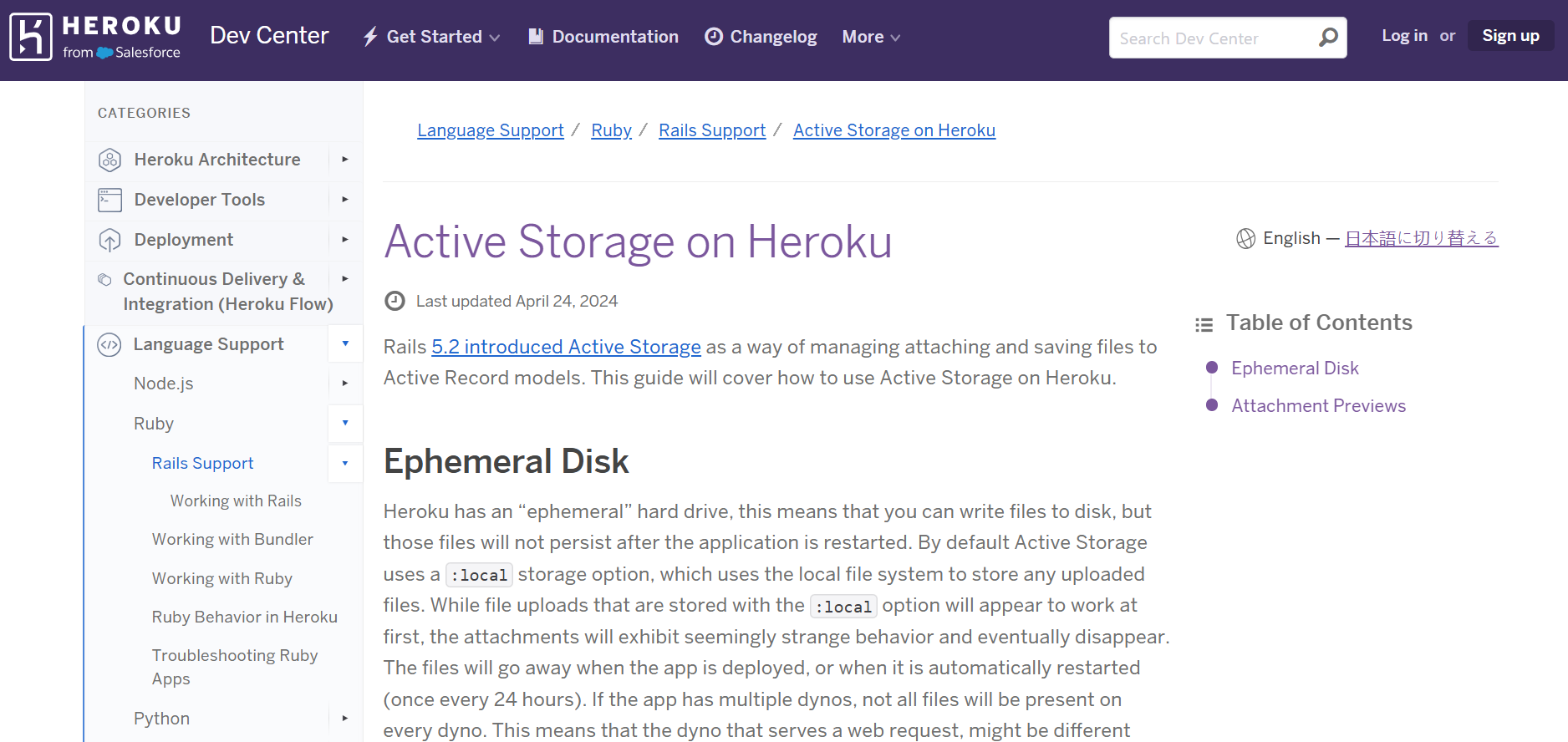
Heroku dynos run with an ephemeral file system where any files written to disk are not persisted across restarts (once every 24 hours) or deployments and are not shared between dynos. For persistent file storage, Heroku relies on add-ons such as Softtrends HDrive for applications to connect to external object storage providers like Amazon S3, Azure Blob Storage, and Google Cloud Storage. Through this add-on, developers configure buckets or containers, upload files, and interact with applications deployed on Heroku via SDKs and dashboards.
DigitalOcean offers built-in persistent options that Heroku’s core platform does not. Heroku dynos are ephemeral, which limits direct file persistence. In contrast, DigitalOcean provides object storage, block storage volumes, shared NFS filesystems, and cold storage options. For applications that require durable file storage or large datasets, DigitalOcean provides native platform support, eliminating the need for third-party add-ons like Heroku.
🎥 Heroku to App Platform: Want to see what the migration looks like before you start planning? Our video covers deploying static sites, dynamic apps with environment variables, managed databases, and serverless functions on App Platform—from repo connection to live URL.
AI and ML workflows
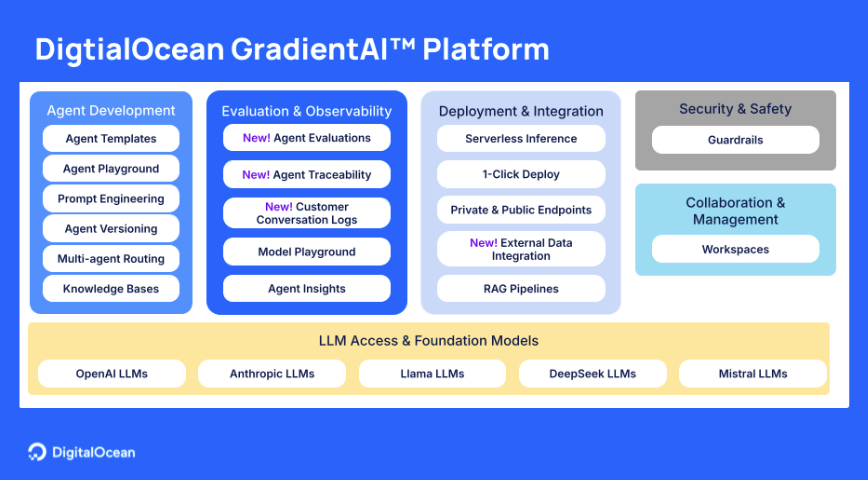
DigitalOcean Gradient Platform
DigitalOcean supports AI and ML workloads through the Gradient™ AI Inference Cloud. It provides infrastructure for model training, fine-tuning, inference, and agent-based workflows. Developers can run GPU Droplets for scalable compute, use GPUs with Kubernetes (DOKS), or deploy on Bare Metal for multi-node, high-performance workloads. The platform supports AI projects from development through production. This makes it attractive for teams building custom ML pipelines, running large language models, or deploying AI agents at scale.
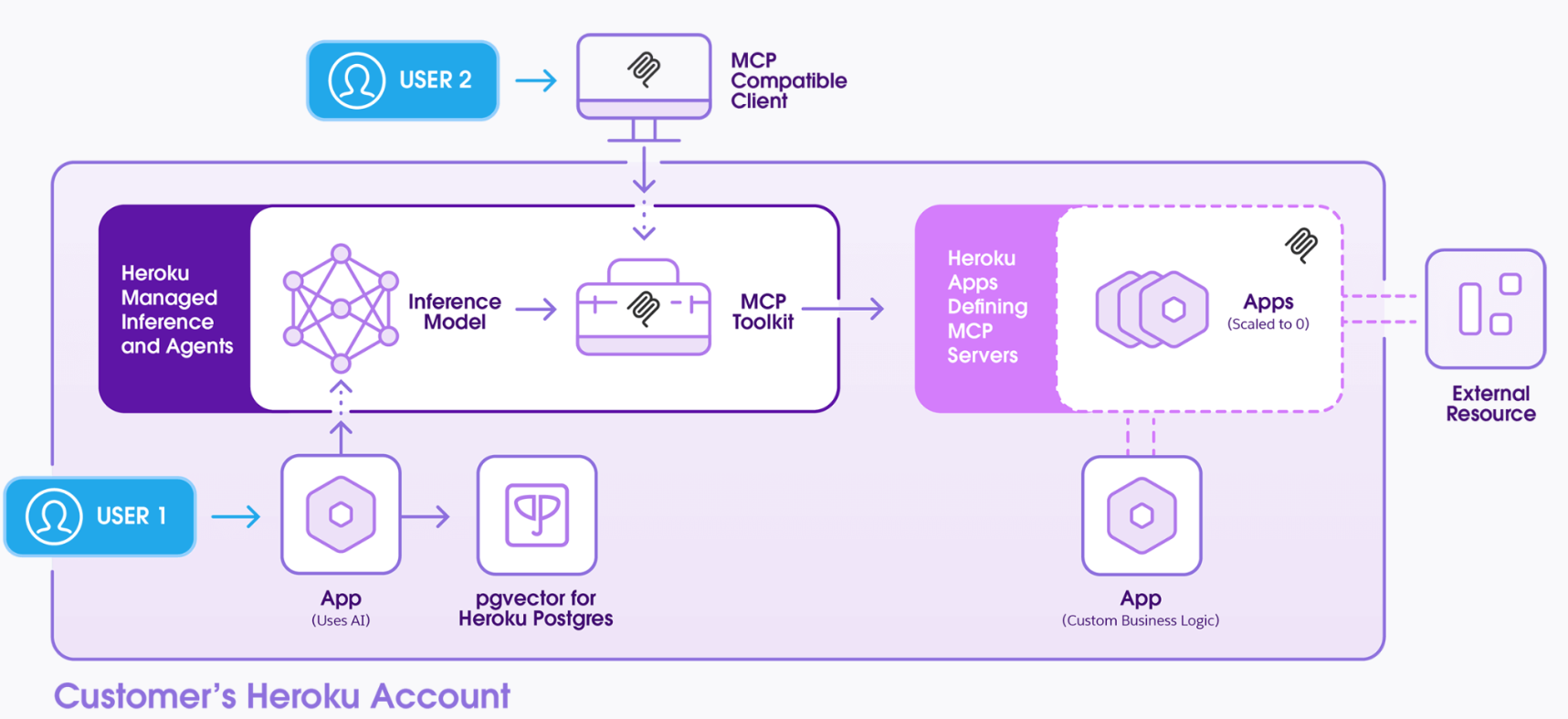
With Heroku Managed Inference and Agents, developers access curated foundation models via API without managing GPU infrastructure. The platform supports Model Context Protocol (MCP) for tool calling and agent workflows with pgvector on Heroku Postgres for embedding storage RAG use cases.
DigitalOcean Gradient AI offers a broader AI infrastructure stack compared to Heroku’s AI capabilities. While Heroku primarily focuses on managed inference and agent APIs, DigitalOcean provides full-stack AI infrastructure with GPU Droplets and Bare Metal servers for high-performance workloads. Another advantage is control. With Gradient AI, developers can choose between virtualized GPUs, containerized environments, or dedicated hardware depending on workload needs. The flexibility supports intensive model training and custom ML pipelines, not just API-based inference. Heroku simplifies development but limits customization and access to GPU-level tuning.
For example, if you’re building a domain-specific LLM for financial document analysis, you may need to:
-
Fine-tune models.
-
Run GPU-intensive training.
-
Store embeddings and deploy inference at scale.
Let’s see how you can deploy and achieve the same functionalities in DigitalOcean and Heroku:
| AI lifecycle stage | DigitalOcean (Gradient AI) | Heroku (Heroku AI) |
|---|---|---|
| Model training & fine-tuning | Train and fine-tune on GPU Droplets, Bare Metal, or GPU-backed Kubernetes clusters | Not supported natively; requires external GPU infrastructure |
| Infrastructure orchestration | Kubernetes (DOKS) with GPU nodes; full compute control | Infrastructure abstracted; no GPU-level orchestration |
| Embedding storage | Managed databases (Postgres, etc.) | Heroku Postgres with pgvector |
| Inference deployment | Deploy custom inference endpoints on GPU or CPU | Managed Inference APIs for curated models |
| Agent workflows | Deploy agents with infra-level control | Managed Inference, MCP for tool integration |
In short, DigitalOcean supports end-to-end AI infrastructure, while Heroku supports AI application integration.
DigitalOcean App Platform abstracts the complexities of infrastructure management, so you can focus on writing and deploying your code efficiently. Develop and scale applications easily with key features like automated deployments, built-in load balancing, and integration with DigitalOcean’s products.
DigitalOcean vs Heroku
Choosing between DigitalOcean and Heroku comes down to your needs: PaaS in sustaining mode or a supported cloud platform with infrastructure control. Both simplify deployment, but they take different approaches to pricing, architecture, and long-term flexibility. Here’s where DigitalOcean stands out:
-
Continuous innovation and roadmap clarity: DigitalOcean continues shipping runtime updates, AI infrastructure enhancements, and developer tooling rather than maintenance-only operations, as seen with Heroku.
-
Cost at scale: Production compute, managed databases, networking, and storage are presented with transparent pricing.
-
Broad architecture support: Native Docker, monorepos, cron jobs, internal routing, CDN, persistent storage, and managed databases reduce the need for external integrations.
-
Full-stack flexibility: Developers can start with App Platform and extend into Droplets, Kubernetes (DOKS), GPUs, or Bare Metal within the same cloud environment.
-
Built for AI workloads: From GPU infrastructure to managed inference environments, DigitalOcean supports both application-layer AI integration and infrastructure-level ML workflows.
-
Easy migration process: App Platform uses Cloud Native Buildpacks, which is the same architectural model as Heroku. Teams can easily migrate with limited workflow disruption, preserving Procfiles and code-first deployment patterns.
DigitalOcean vs Heroku FAQs
Is DigitalOcean cheaper than Heroku for production applications? For many production workloads, DigitalOcean can be more cost-effective than Heroku. Core infrastructure features like VPC, CDN, and internal routing are included rather than priced as add-ons. The cost difference can become more noticeable as applications scale, depending on your use case.
When should a team move from Heroku to DigitalOcean? Teams evaluate options after Heroku’s shift to a sustaining engineering model, as long-term platform innovation and continued feature development are important to any product roadmap. It’s also a common transition for teams adopting Docker, Kubernetes, or GPU-based workloads that require deep infrastructure flexibility. For organizations that want an actively evolving platform with broad native service integration, DigitalOcean is a strong fit.
How does DigitalOcean App Platform compare to Heroku Dynos? Heroku Dynos abstract infrastructure into predefined runtime units, while DigitalOcean App Platform runs containerized workloads with clearer CPU and memory allocation. DigitalOcean also supports Dockerfiles and monorepos natively.
What are some of the scaling limitations of Heroku? Heroku scales by increasing dyno counts, but persistent storage is not native, and networking isolation requires higher-tier plans. GPU-based training is not supported natively. Certain architectural patterns may require add-ons or external infrastructure.
How difficult is it to migrate an app from Heroku to DigitalOcean? Migration is straightforward because DigitalOcean App Platform uses Cloud Native Buildpacks similar to Heroku. Procfiles, environment variables, and Git-based workflows remain familiar. Most applications can be deployed with minimal changes.
Can I migrate my persistent data?
Yes. While Heroku uses an ephemeral file system, where any data written to local disk is wiped upon restart or redeployment, DigitalOcean provides native support for persistent storage.
By leveraging DigitalOcean Volumes block storage or S3-compatible Spaces object storage, or Network file storage, you can attach dedicated, high-performance storage to your apps. This helps ensure your data survives redeploys and reduces the need for third-party storage add-ons often required in the Heroku marketplace.
Migrate from Heroku to DigitalOcean App Platform
DigitalOcean App Platform is built on the same Cloud Native Buildpack architecture that made Heroku successful—so applications using Procfiles, environment variables, and buildpack-based deploys generally run with minimal code changes. We’ve been helping teams migrate off Heroku since 2022, and the platform has only gotten stronger since.
-
Buildpack compatibility: Auto-detected builds for Node.js, Python, Go, Ruby, PHP, Rust, and Bun—no Dockerfile required.
-
Full application modeling: Web services, background workers, cron jobs, and pre-deploy jobs map directly from your Heroku Procfile.
-
Managed databases: First-party PostgreSQL, MySQL, MongoDB, Redis/Valkey, Kafka, and OpenSearch with private VPC networking.
-
Environment management: Tag apps as Development, Staging, or Production with one-click app cloning across environments.
-
Autoscaling and scale-to-zero: Scale up Droplets automatically on traffic spikes and scale down when idle—billed by the second.
-
AI-ready infrastructure: Deploy MCP servers, run OpenClaw agents, and integrate with Claude Code and Cursor via App Platform Skills.
-
AI-assisted migration with App Platform Skills: Open-sourced playbooks for AI coding assistants to automatically convert Heroku Procfiles and configurations into a production-ready DigitalOcean App Spec (.do/app.yaml), simplifying full-stack migrations, database setup, and CI/CD deployment through natural language.
-
Growth beyond PaaS: When workloads outgrow App Platform, move to Kubernetes, Droplets, or Gradient AI without switching providers.
Whether you’re running a single web service or a multi-process production stack, App Platform gives you the developer simplicity Heroku was known for—backed by a full cloud platform and an active roadmap.
Get in touch to discuss your migration with our Solutions team
All reported metrics, including cost savings, performance comparisons, and migration timelines, are based on specific customer case studies, publicly available documentation, and projections as of the date of publication. Actual performance, costs, and time required for migration will vary significantly based on your specific application architecture, workload, region, and individual resource requirements.
Any references to third-party companies, trademarks, or logos in this document are for informational purposes only and do not imply any affiliation with, sponsorship by, or endorsement of those third parties.
About the author

Sujatha R is a Technical Writer at DigitalOcean. She has over 10+ years of experience creating clear and engaging technical documentation, specializing in cloud computing, artificial intelligence, and machine learning. ✍️ She combines her technical expertise with a passion for technology that helps developers and tech enthusiasts uncover the cloud’s complexity.
Get started for free
Sign up and get $200 in credit for your first 60 days with DigitalOcean.*

*This promotional offer applies to new accounts only.